It's About Time: 

We have a thing about accurate time. We're the ones who set our quartz watches by calling the U.S. Naval Observatory at +1 (202) 762-1401, listened to WWV on the Shortwave and we're the ones who noticed New Year's on TV was several seconds after our own clocks hit midnight.

Now we measure time to the millionths, if not billionths, of a second. Here you can compare performance data of our five Network Time Protocol time servers and check on some NTP clocks and Swiss watches in our collection.

Accuracy Beyond One Microsecond

At this point, all of our servers are more accurate that one millionth of a second (one microsecond), but how does our DIY Raspberry Pi Stratum 1 time server's performance compare to an atomic clock?
First off, although they're presuably exceptionally precise (reporting to billionths of a second), all of our servers depend on GNSS Time Transfer, which is "only" accurate to within 40 billionths of a second (40 nanoseconds). Given other limitations in my setup, I believe my equipment's ability to record accurate time is "only" within 100 billionths of a second (100 nanoseconds) and our precision over twenty-four hours is around five nanoseconds.

With that caviat, the answer is the RPi does okay, so long as it maintains a GNSS connection and does not have other workloads.

As noted elsewhere on this page, I made a Raspberry Pi time server for about $100. I am fortunate to have a vintage 2016 Orolia/Spectracom SecureSync Time and Frequency Reference System with rubidium oscillator and thought it would be fun to compare the two. The SecureSync is a real atomic clock that is expected to lose one second every 32,384 years without any external correction. Its stability also means that it can report time with an estimated time error of less than 10 billionths of a second (10 nanoseconds). This ability to keep accurate time over long periods without external corrections is why it earns its price (lists at about $9,000), but fortunately, I got ours used at a substantial discount.

And to be clear, NTP server is just one of the SecureSync's functions -- most of its precision timing capabilities are out of scope for this discussion, but...
Nirvana! Estimated Frequency Error Better than One Billionth of a Second!

And here we are! Our Spectracom SecureSync claims to be accurate to better than one nanosecond (one billionth of a second)! It's true: when the stars (GNSS satellites) align for long enough, we're able to get very accurate frequency (a pulse every second to within a billionth of a second).

To get this accuracy, it's all about a clear skyview for the GNSS antenna that gives it the best geometry for accurate time transfer. That and a very stable oscilator that is able to incorporate the GNSS messages over time and average / interpolate them into this occasional epic accuracy. 

My biggest impediment to stability is keeping the crystals at the same temperature. We don't have a climate-controlled server room, so even a few degrees temperature change can dramatically throw off our accuracy for hours as the crystals are recalibrated.

Placeholder Picture

(Yes, I am aware that this precision is well beyond the accuracy our systems can obtain.)

The reality is that the world's most authoritative clocks don't have the exact same frequency and time either and vary substantially with each other by tens of nanoseconds.

Check out these graphs: We removed GNSS discipline from this Raspberry Pi about 2 1/2 hours into the plot. Since the RPi doesn't have a real-time clock, It immediately loses about two thousandths of a second in three hours. Workloads and temperature changes affect this, so over the course of a year, the variance could be substantial (one site suggests several minutes). Over a similar period, the SecureSync has no visible accuracy loss (note the scales are different). The one thing we could tell from the SecureSync console is that Time Figure of Merit (TFOM) dropped from (10 nsec < ETE <= 100 nsec) to (1 μsec < ETE <= 10 μsec). ETE stands for Estimated Time Error and reflects the server's estimate of of how far misaligned it is with its reference PPS signal.

RPi Drift After Losing GNSS Signal
NTP 3 after Twelve Hours Without GNSS Signal
SecureSync After Losing GNSS Signal
SecureSync after Twelve Hours without GNSS Signal
So, how does the RPi do when there's a good GNSS signal?

It turns out the RPi does pretty well in maintaining accurate time under a load of under a hundred devices. The histogram shows 99% of readings are within one microsecond and it's a very even distribution. The SecureSync performs slightly worse as an NTP server, with 99% of the readings within one-and-a-half microseconds. But look at its frequency jitter. It's only 500 trillionths of a second (half a nanosecond, or 500x10-12!.

Also note this exposed some jitter issues that I believe are on the Raspberry Pi side. Although the RPis' reports claim super accuracy, reports show more jitter and sometimes substantial offset on the NTP client -- you can't really see this unless you have at least two servers that are clients of each other.

Jitter from RPi 4 to RPi 3 Downgrade (NTP3)
Increased Jitter after RPi4 to RPi3 downgrade.

We downgraded this server from a Raspberry Pi 4 to a Raspberry Pi 3. I was surprised that the jitter increased at least five times! We simply moved the GNSS HAT and SD Card to the new Pi, so the software is identical.

Jitter from Other Loads on RPi 4 (Reporting)
Time and Frequency Jitter Caused by Heavy Hourly Loads

Reporting runs Python jobs for the first 15-20 minutes of each hour. This causes the computer to heat up and adds substantial time and frequncy jitter.

This is an important point. If you're doing this because you really care about accurate time, it's important that the RPi have as few other tasks as possible (including background tasks loaded as part of the standard RPi installation. In my experience, even copying a one megabyte file can make for substantial jitter / frequency error.


NTP1 - Raspberry Pi 4 with Uputronics GPS/PPS Placeholder Picture

A Stratum 1 NTP Time Server Using NTPSec (GPS, Galileo, GLONASS)
NTP1 used to be our external NTP server and supports outbound NTPSec NTP queries. Unfortunately, it turns out that even on a business account, Spectrum blocks inbound NTP queries as they consider them to be a potential denial of service vector. Annoying.

This is our only NTP server with external NTP sources, which are remnants of our NTPSec testing.

Generally, over twenty-four hours we expect 99% of the readings from this server to be within one microsecond (one millionth of a second). 

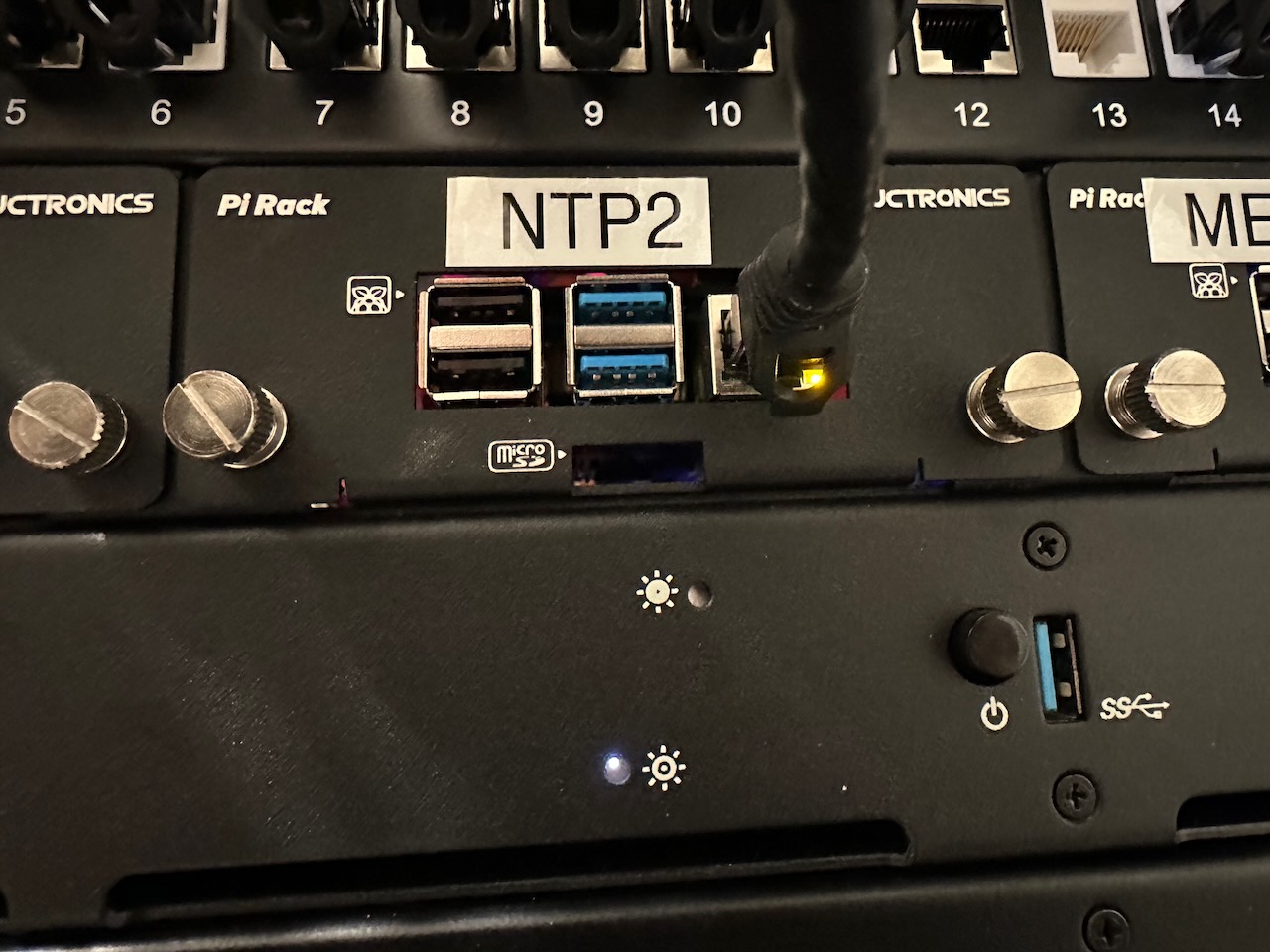
NTP2 - Raspberry Pi 4 with TimeHat GPS/PPS Current NTP2 Local RMS Time Jitter

A Stratum 1 NTP Time Server Using Chrony (GPS, Galileo, BeiDou)
NTP2 is almost identical to NTP, aside from servicing NTP using Chrony. It is only available internally, Chrony data is converted via script so it can be compared to our other servers. Details can be found in any of the hourly reports.

Look closely at Chrony's jitter at the top of every hour. There is the Chrony logfile copy job that none of our other servers have and this job creates enough of a load to cause jitter. I have already moved file processing to a different machine, but just copying the file caused the jitter.

Generally, over twenty-four hours we expect 99% of the readings from this server to be within one microsecond (one millionth of a second).

NTP3 - Raspberry Pi 3 with Uputronics GPS/PPS Current NTP3 Local RMS Time Jitter

A Portable Stratum 1 NTP Time Server Using NTPSec (GPS, GLONASS)
NTP3 is a portable PPS enabled time server. It is mobile and can be connected to the network via ethernet or wi-fi. We've added it so test a lower power RPi in a sub-optimal network configuration. For best portability, this Raspberry Pi can be powered by AC power by adapter, or by Power over Ethernet. Although you can see this generic patch GNSS antenna is artfully bound to the RPi with rubber bands, there's about ten feet of cable that can be unwound for better positiioning.

Because of being on WiFi, using an RPi 3, having a real-time clock and keeping the antenna indoors, this server's accuracy is substantially diminished. 

We're also using an older version of the Uputronics GPS HAT here that does not include a real-time clock, which does make for additional substantial variance each time this is rebooted.

NTP4 - Orolia/Spectracom SecureSync 1200 Rubidium Disciplined Oscillator NTP Server (Using NTPD) A real atomic clock! Current SecureSync Local RMS Time Jitter

Spectracom SecureSync 1200 Rubidium Disciplined Oscilator (GPS, Galileo, GLONASS)
TP4 is probably why you made it to this page. Here is our atomic clock, an Orolia/Spectracom SecureSync 1200 rubidium disciplined oscilator NTP Server. This appliance can keep within 1 microsecond (one millionth of a second) per twenty-four hour period without a GNSS signal, but that's not exactly why we got it. We're interested to see what happens with a time source with an extremely low frequency jitter when the GNSS source is removed. Generally, when there is a GNSS signal, we expect this server to be within a few billionths of a second of "true" time. And sometimes it reports it's with in one nanosecond of "true" time.

For comparison, without a GNSS signal, our RPi NTP servers can expect to drift 450 microseconds (almost a thousandths of a second) per day.

NTP5 (REPORTING) - Raspberry Pi 4 Current Reporting Local RMS Time Jitter

A Stratum 2 NTP Time Server Using NTPSec (Not GNSS Disciplined)
Reporting has other tasks and is the only time server that's not disciplined by GNSS, meaning it keeps its accuracy only through NTP connections to our other servers.

Generally, over twenty-four hours we expect 99% of the readings from this server to be within twenty microseconds (twenty millionths of a second). But if it were to lose NTP connection, it could easily be off by as much as four minutes in a month.

NTP6 - LeoNTP Time Server 1200 Current Reporting Local RMS Time Jitter

The LeoNTP Stratum 1 time server is truly an appliance. There is no configuration at all aside from setting a static IP address if you need one. Unlike the other servers, it doesn't even need to connect to another NTP server as part of its sanity check. It doesn't offer reporting, so all we can show you is what the other servers see from their time services.

Odds & Ends

I thought about writing my own How-To Make a Stratum 1 Raspberry Pi NTP Server instructions, but I quickly realized there are already plenty of good ones.

In fact, I used some of them to make my own.

So, instead, I decied to write about my interest in accurate time, the path to rediculous precision and getting this accuracy into the home through GNSS Time Transfer using inexpensive devices.

The Home Lab
The Home Lab Server Rack

The Most Accurate Time

There are enthusiasts with the equipment AND the skills to measure the most accurate time

LeapSecond.com is an incredible collection of time and frequency measuring equipment along with experiments that prove for the first time, outside a multi-million dollar laboratory, that Einstein's Theory of Relativity is valid. 

This lovely presentation by Tom Van Baak illustrates increasing clock / frequency accuracy in Clock Powers of Ten from dripping water through to the most accurate cesium clock.. Spoiler: By a large factor, Earth is less accurate than the time we're able to measure. And maybe we'll eliminate leap seconds because of it -- all brought on by the possibility of a negative leap second, an IT issue not contemplated by most.

All About Time

If you want to go deep into time, check out NIST.gov

The National Institute of Standards & Technology maintains the United States Master Clocks. Are you a time geek? Learn about an in development strontium clock that would not have gained or lost a second since the beginning of the universe! Your tax dollars at work.

Condon and Lyons with Early Atomic Clock

Visualizing Scale

We're talking crazy small numbers here

There are lots of ways to describe a microsecond: it's a millionth of a second or 0.000,001 or 10-6 or 1e-6 -- but what does that really mean?
This TED Talk by Kim Preshoff may help.

Also, visit Clock accuracy in ppm for an interesting technical discussion of various oscillators' accuracy over time. (Cesium clocks lose one second over 32,384,400 years!)

Millisecond vs Microsecond vs Nanosecond

Another way to conceptualize incredibly small numbers

Gary Explains makes it easy to visualize these small numbers in relation to the speed of light. Grace Hopper's appearance on David Letterman is thrown in for good measure. If you like this video, you might as well watch the sequel: How Computers Synchronize Their Clocks - NTP and PTP Explained


My interests are perhaps more simple. I just want all of my clocks & watches to match! I took these watches outside for a few hours to let them charge. Overnight, the Citizen Radio Controlled watches all got in sync (too bad about the Seiko and Oceanus). I love how the second hands all align (and that they match our atomic clock)!
Synchronized Radio Controlled Watdches
Analog / Atomic clocks in sync.

The Inevitable FAQ

Segal's Law: A man with a watch knows what time it is. A man with two watches is never sure.

Instead of writing my own How-To Make a Stratum 1 Raspberry Pi NTP Server instructions, you get a FAQ instead.

Some NTP Clocks

What good is all this precise time without some way to display it? 

Nixie Clock on Mantel
A Simple Nixie Clock

This is an older PV Electronics nixie clock that has a PS2 GNSS input for timekeeping. I struggled for years between putting the clock where I wanted and keeping the GNSS antenna with a clear sky view. Finally, I found the Azevedo Devices nwts NTP client. It's brilliant! It's powered by the clock itself and connects to our time servers by Wi-Fi to keep the clock on time. It even automatically corrects for Daylight Savings Time. All I had to do was solder it together and figure out the pinouts from the 3.5mm jack current clocks use.

Projection Clock by Bedside
A Projection Bedside Clock

I guess a lot of people can't get this La Crosse Technology Wi-Fi Projection Weather Station and Clock to work, as there are lots of returns on Amazon, but I think it's really good. It connects to our time servers by Wi-Fi, it clearly projects the current time on the ceiling and it's able to dim itself at night. (You'll need to go to their website to figure all of this out.) And it gives the weather too -- more than I need, but the best I've found. It replaced a projection clock that would get time signals from WWVB.

SecureSync TFOM View
A Real Atomic Clock!

Our vintage 2016 Spectracom SecureSync is a real atomic clock -- although it gets its time from GNSS like all of our other time servers, this uses rubidium's properties to discipline the clock and make it much more stable than the crystal oscillators on our other servers. In fact, this uses the same u-blox M8T GNSS receiver as our RaspbRerry Pis. When not connected to GNSS, this server can maintain accuracy to within one microsecond per day, Perhaps 32,000 years to be off by one full second!

SecureSync TFOM View
Standalone NTP

The LeoNTP Time Server 1200 is unique in that it doesn't require an internet connection to work. All of our other time servers need to connect to other time servers to get the time -- even if it's connected to a GNSS. This is as simple as NTP gets. Plug it into the network and point clients to it. You'll never have to think about it again.

HP59309a Digital Clock
Not an Atomic Clock

When this Hewlett-Packard HP 59309A was new, some fiftty years ago, it was able to keep time to within one minute a month. Now, with help from our atomic clock, it receives a signal that helps it keep time as accurate as our newest clocks. Also in this rack, I have the K10 5992A Standby Power Supply, 59303A Digital to Analog Converter and K34 59991A Phase Comparitor.

HP59309a Digital Clock
An Expensive PoE NTP Clock

Many sellers offer variations of this NTP clock with power-over-ethernet. It's designed for schools / hospitals & factories and comes with its own proprietary software that can configure many of these in your facility all at once. If you don't need that functionality, it seems expenive to me and I could have built something fancier for less.


Here are some watches I've collected that set time either by radio or Bluetooth. I got most of these in Japan and have the manuals I can't read to prove it.


Seiko Radiowave Receiving Time
This Retro Radio Watch was Way More Expensive than You'd Think

In 2010, Seiko brought us the Radiowave Control Solar SDGA003 watch that looked like a Casio G-Shock knock-off, but was packed with technology. It had a super-legible e-ink display, titanium body and like the other radio watches, could use WWVB to sync time. Although screen refresh was slow, there were several faces and it is a fun watch to wear and gets comments even now.

Citizen Bluetooth Watch
A Watch Set With Bluetooth

This Citizen W760 (circa 2012) was innovative for the time. It used a Bluetooth LE connection to your iPhone (series 4s only) to maintain time, run the perpetual calendar and notify you when the phone rang. Without being connected to the phone, accuracy was expected at 15 seconds a month. Of course back then, even the phone's time wasn't all that accurate, so maybe what's the point?

Limited Edition Citizen Radio Controlled Watch
One of my Favorites

This limited edition of 2500 radio controlled Citizen GN-4W-S-12G has an easy-to-set second time-zone function. I thought it looked sharp with the gold-tone stainless steel and crocodile band. 


Casio Waveceptor Watch
Inexpensive Radio Controlled Watch

The most striking thing about this Casio WaveCeptor is the price, which was well under $100. It tried six times a day to set itself to WWVB in Fort Collins, CO, or its equivalent radio stations in Japan and England. Unfortunately, its battery needs to be replaced, so I don't know if it still works.

But don't worry -- Casio fixed the price problem with an entry from their high-end Oceanus line.

Oceanus Radio Controlled Watch
Does Everything the Casio Does at Ten Times the Price

The Oceanus OCW-M700 took the Casio WaveCeptor concept and added solar charging, a titanium body and sapphire crystal and sold it for 10x the price of the Casio. The used market has taken care of that and this Oceanus can now be had on eBay for the price of the Casio.
On top of all its downsides, it never got a good radio signal.


These days, it seems like I only wear an Apple Watch, but I have a soft spot for Swiss watches.


IWC Watch Front
IWC Watch Back
IWC Fliegeruhr UTC

I've had this watch for more than twenty years and it's always my go-to. It is an extremely practical design, allowing a standard time in the UTC window and easily moving the hour hand backwards or forwards to new time zones. And it's automatic, so yo don't have to remember to wind it. It's been in for service twice and I've always missed it while it's been away. We went to visit the IWC museum and this model was featured at least three times!

IWC
Jaeger-LeCoultre Watch Front
Jaeger-LeCoultre Watch Back
Jaeger-LeCoultre Master Geographic 142.8.92

I thought I wanted a Reverso, but this does just fine. Another automatic watch I've enjoyed over the years. I felt it was too formal for everyday use, but enoyed flipping it over and watching the movement.

Note that I have a thing for dual timezone watches? The second timezone was easy to set by selecting the city in the bottom window -- and viewable in the small clock face on the southern park of the dial.

Other Interests

Aside from watches and time, I do have some other interests.

Ar Quality Chart
Weather Forecasting & Air Quality

Not happy with local weather forecasts, I decided to leverage my desire to put excessive accuracy into things that aren't all that accurate or predictable and learned more about how to forecast for my own microclimate. The results have been variable, but the weather station's current conditions, at least, are highly accurate.